Splitwise alternative
Split bills without making everyone download another app.
Splitwise is useful for ongoing household or trip expenses. Hati is built for the faster restaurant moment: one person paid, everyone needs the exact KKB amount, and the collection has to stay clear after the group leaves.
Alternatives
Splitwise Alternative for KKB in the Philippines
The difference is the job
Splitwise is built around a ledger. It is good when roommates, trips, or couples need a running record of many expenses. Hati is built around a single bill that needs to be settled quickly.
That difference matters at a restaurant. Nobody wants to create an account just to pay for one dinner. The person who covered the bill needs a clean breakdown, friends need their amount, and the group chat should not become a math worksheet.
When Hati is the better fit
- A barkada dinner where one person paid first.
- An office lunch with solo orders and shared food.
- A class project meal where some people left early.
- A family bill with service charge, discounts, and uneven orders.
- A quick ambag situation where the organizer wants proof of who paid.
Hati handles the short-lived collection moment. The organizer creates the split in the iPhone app, sends the link, and sees who marked paid later.
What friends see
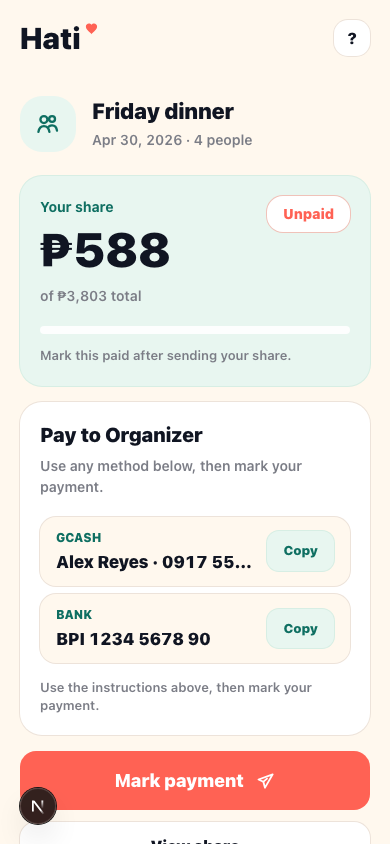
Friends do not need the app. A personal Hati link opens in the browser with their amount due, payment details, and a mark-paid action. The group link shows the full breakdown when someone wants to check how the amount was calculated.
That keeps the social part lighter. Instead of sending a long screenshot, a copied payment number, and a separate list of who has paid, Hati keeps those pieces attached to the bill.
Hati vs. Splitwise for one dinner
Hati
- Best for one receipt and one payer.
- No participant accounts.
- Browser links for friends.
- Payment status belongs to the bill.
- Designed around PHP, KKB, and PH payment habits.
Splitwise
- Best for ongoing shared expenses.
- More useful when everyone joins the same shared ledger.
- Good for trips, roommates, recurring balances, and long-running groups.
A realistic KKB example
Four people eat at a restaurant. Two share sisig, three share crispy pata, one person orders a solo coffee, and the bill includes service charge. If the group splits evenly, someone overpays. If the organizer does the math in chat, it is easy to miss a shared item.
In Hati, the organizer adds the receipt lines, assigns each shared dish to the people who ate it, adds service charge, reviews the final total, then shares links. The amount each person sees is tied to the item math.
The main point
If your group needs a long-term expense ledger, use a ledger app. If your group needs to settle one KKB bill before everyone forgets, Hati is the simpler fit.
Common questions
Before the next bill.
Does everyone need to install Hati?
No. The organizer uses the iPhone app. Friends can open their personal amount or the group breakdown in a browser.
Is Hati a payment app?
No. Hati calculates, shares, and tracks the split. Payments still happen through your usual GCash, Maya, bank transfer, cash, or other external method.
Can Hati replace a spreadsheet or calculator?
For one-off restaurant bills, yes. Hati keeps item assignments, fees, discounts, rounding, payment links, and paid status in one flow.
More Hati guides
Keep the next split cleaner.
KKB
KKB Bill Splitter for Friends and Barkada Meals
Split KKB bills with Hati. Add people, assign shared dishes, include service charge and discounts, then send browser payment links.
Sharing
Split Bills With One Link
Hati lets one person create a split in the iPhone app while everyone else opens a browser link to see their amount and mark paid.
Receipts
Receipt Splitter for Long Restaurant Bills
Use Hati to split restaurant receipts, review optional Hati AI imported lines, assign shared food, and track paid status with browser links.