One-link bill splitting
Only one person needs the app.
Hati is designed for the organizer who paid first. Create the split in the iPhone app, then share browser links so everyone else can check their amount without installing anything.
Sharing
Split Bills With One Link
Why one link changes the bill split
Most bill splitting breaks down after the calculation. The organizer posts a screenshot, sends payment details, waits for replies, and then manually remembers who paid.
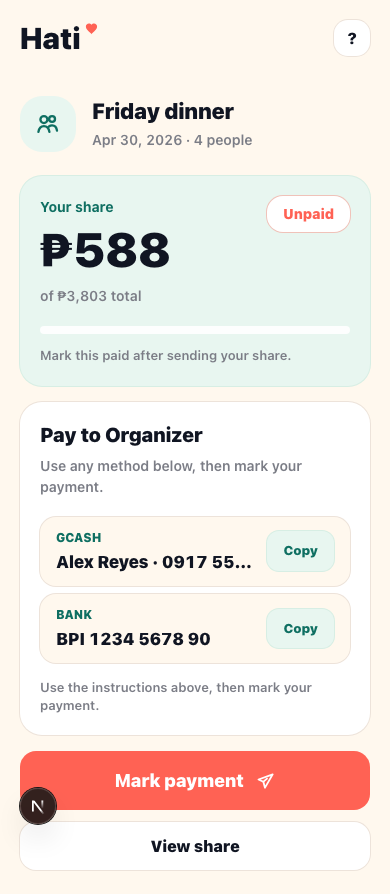
Hati keeps the post-calculation flow simple. One person creates the split. Everyone else opens a link. The link shows the amount due, payment details, and payment status controls.
What the organizer does
The organizer uses the iPhone app to create the bill. They add people, enter or import receipt lines, assign items, add fees or discounts, and review the final total.
When the split is ready, Hati creates share links. The organizer can send the full group link or participant links that open directly to each person's amount.
What friends do
Friends open the link in a browser. They do not need the app or an account. They can see how much they owe, copy the organizer's payment details, and mark themselves paid after sending money.
If proof upload is enabled, they can also attach a payment screenshot. That keeps collection evidence with the split instead of buried in chat.
Why this is better than a group chat breakdown
Group chat is noisy. People react to old messages, payment details get repeated, and the paid list becomes stale. A Hati link stays focused on the bill.
The organizer can check the status later and see paid, partial, and unpaid states in one place. The split does not depend on everyone remembering the same screenshot.
Hati still does not move money
Hati is not a wallet, bank, or payment processor. It only calculates the split, communicates the amount, shows external payment details, and tracks status.
That keeps the product focused on the real job: making KKB easier when one person pays first.
Common questions
Before the next bill.
Can I send one group link?
Yes. Hati can share a group breakdown link and participant-specific payment links.
What happens if someone pays only part of the amount?
Hati can track a partial payment and show the remaining balance.
Can people see the full breakdown?
Yes. The shared split page can show the group payment progress, line items, and breakdown.
More Hati guides
Keep the next split cleaner.
Alternatives
Splitwise Alternative for KKB in the Philippines
A practical Splitwise alternative for quick KKB restaurant bills in the Philippines: one person creates the split, friends open browser links, and paid status stays visible.
KKB
KKB Bill Splitter for Friends and Barkada Meals
Split KKB bills with Hati. Add people, assign shared dishes, include service charge and discounts, then send browser payment links.
Receipts
Receipt Splitter for Long Restaurant Bills
Use Hati to split restaurant receipts, review optional Hati AI imported lines, assign shared food, and track paid status with browser links.